Purchase notes
Record where you bought the wine and what you paid. A note about a tasting, recommendation or gift can help you remember how it found its way into your collection.
Keep a record of the wine you own and the bottles you would like to try. Your notes are there when you next buy or open a wine.
One cellar and up to 50 bottles, free. No card required.
Record where you bought the wine and what you paid. A note about a tasting, recommendation or gift can help you remember how it found its way into your collection.
Save wines you’d like to try and group them for a birthday, a dinner or a trip. Keep a note of the recommendation or where you found the wine, then add it to your cellar when you buy it.
Charts show how your collection divides by region, grape, colour and vintage, alongside the wines you’ve rated highly and the bottles you’ve added and opened. Premium and Collector also include AI insights based on your collection.
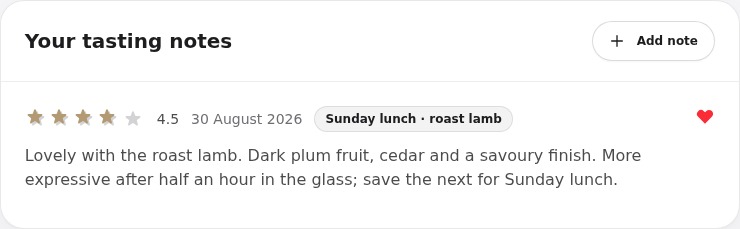
Add a note after opening a bottle, with a rating or photograph if you like. Read it next time you are considering the same wine.
Invite someone to browse your cellar or help look after it. For a wine you think a friend would enjoy, share a link to just that bottle or tasting note. The rest of your collection stays private.
Illustrative wishlist: Sunday lunches. Keep a note to buy another case of Viña Alberdi 2019 after enjoying the last bottle with roast chicken. A wishlist is for wines you would like to buy; it does not add bottles to your cellar.
Return to your tasting history before buying again. The date, occasion and your own impressions can tell you more about what you enjoy than a published score alone.
It records the wines you own, the bottles on your wishlist and your tasting notes in one account.
Yes. The collection is private by default. Sharing only happens when you invite someone to a cellar or create a public link for a particular bottle or note.
Yes. SmartCellar is available on the App Store for iPhone and through a web browser, with the same collection in both.
One cellar and up to 50 bottles. No card required.